

When search visibility starts to slip, most teams look first at the usual suspects: content quality, headline writing, keyword targeting, site authority, backlinks, maybe even publishing frequency. All of those matter. But sometimes the issue is more fundamental. Sometimes the problem is not the content itself, but the way that content is presented on the page.
That is where the DOM comes in.
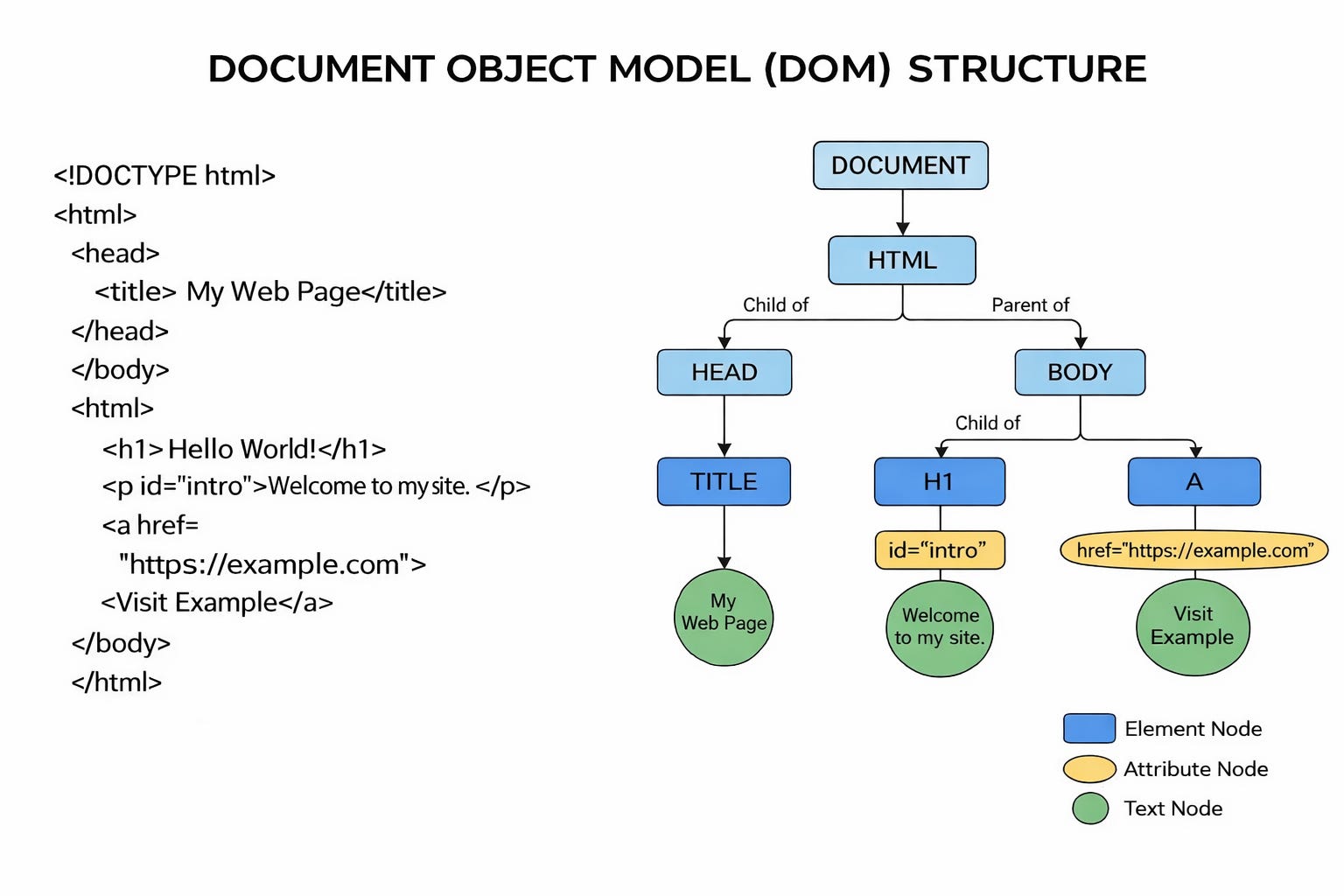
The DOM, or Document Object Model, sounds more technical than it needs to. In simple terms, it is the structured version of a webpage that a browser creates when it loads a page. Think of it as the page’s working layout behind the scenes: the headline, standfirst, article body, links, images, captions, menus and interactive elements all organised into a structure that both browsers and search engines can interpret.
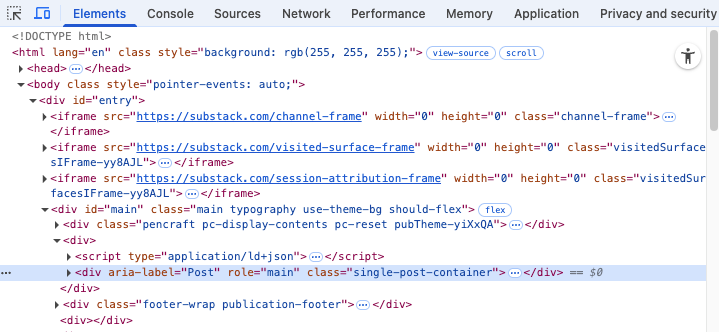
For the uninitiated, the quickest way of viewing the DOM is by using browser developer tools like this version in Chrome. It might look scary at first but, trust me, these tools contain a goldmine of information about your pages.
For SEO, the DOM matters because search engines judge your articles (and, in tandem, your brand) by what they can actually access, process and understand.
A page may look fine to a person. It may load eventually. The content may appear after a second or two. But if the important parts of that page are missing, delayed, hidden or difficult to interpret in the DOM, search engines may not get the same clear view of the content that users do. And if search engines do not get that clear view, your ability to rank suffers.
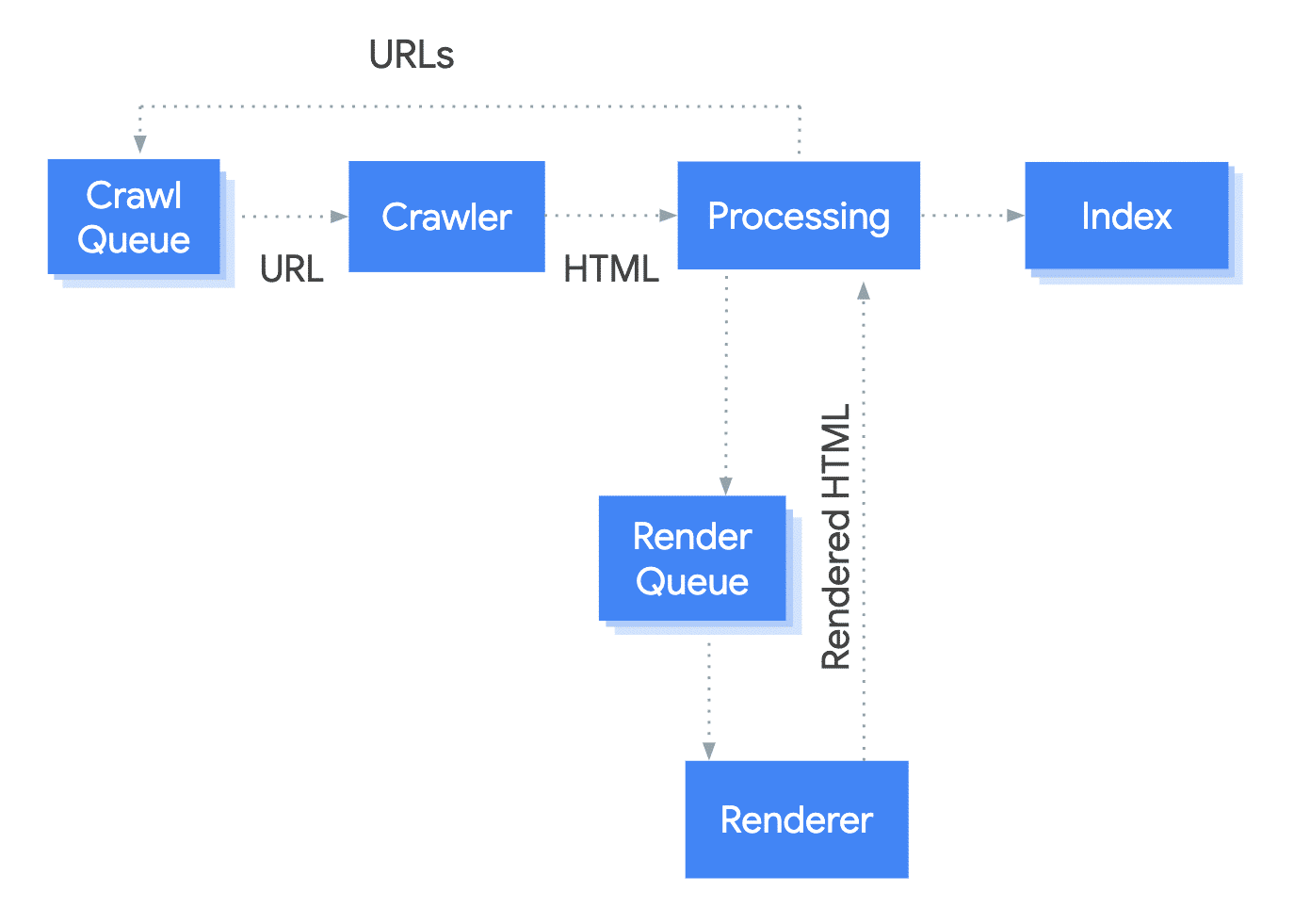
Google issued this helpful diaphragm to illustrate how the process of rendering is another step the crawler must take before it can hand over to the indexing stage. The implication here is is that any issues introduced at this stage will have a knock on effect to both indexing and ranking.
That is why the DOM is not just a developer concern. It matters to SEO teams, product teams, publishing leaders and anyone responsible for traffic and discoverability.
How does the DOM work in practice?
When a search engine visits a page, it starts by crawling the URL and collecting the underlying code. It then tries to make sense of the page structure, including any content that is generated or changed after load. On a straightforward page, that process is relatively simple. On a modern site built with JavaScript-heavy templates, dynamic modules and layered components, it becomes more complicated.
This is where confusion often creeps in. Many teams assume that if a user can eventually see the content, search engines can too. That is not always a safe assumption. Search engines have become much better at rendering modern websites, but that does not mean every implementation is equally easy to process. The more effort required to reveal the important content, the greater the risk that signals are delayed, weakened or missed.
For publishers and content-led businesses, this shows up in a few familiar ways.
One common issue is content that is technically on the page, but not clearly presented in the structure search engines rely on. A headline may be styled to look prominent, but not marked up clearly. Key sections of text may be injected late by JavaScript. Internal links may look clickable to users but not function like proper crawlable links in the code. A related-content module might be visually helpful while doing very little for discovery because its links are not exposed properly.
Another problem comes from over-designed templates. In the push to create rich, flexible page experiences, teams sometimes end up fragmenting content into so many components that the main purpose of the page becomes less obvious. A search engine should not have to work hard to identify the headline, the body copy, the supporting links and the relationship between them. The DOM should make those things easier to understand, not harder.
There is also a mobile dimension that is easy to underestimate. Many teams still review pages mainly on desktop, but search engines increasingly assess sites through a mobile lens. If the mobile version of a page hides text, strips out useful links, collapses important elements or serves a lighter experience than desktop, that can affect how well the page performs in search. A clean desktop page is not enough if the mobile DOM is weaker.
The encouraging part is that most DOM-related SEO issues are not mysterious. They are usually the result of choices that can be reviewed, tested and improved. Let’s take a look at some of these steps.
Step One: Understand the difference between ‘Source HTML’ and ‘Rendered Version’
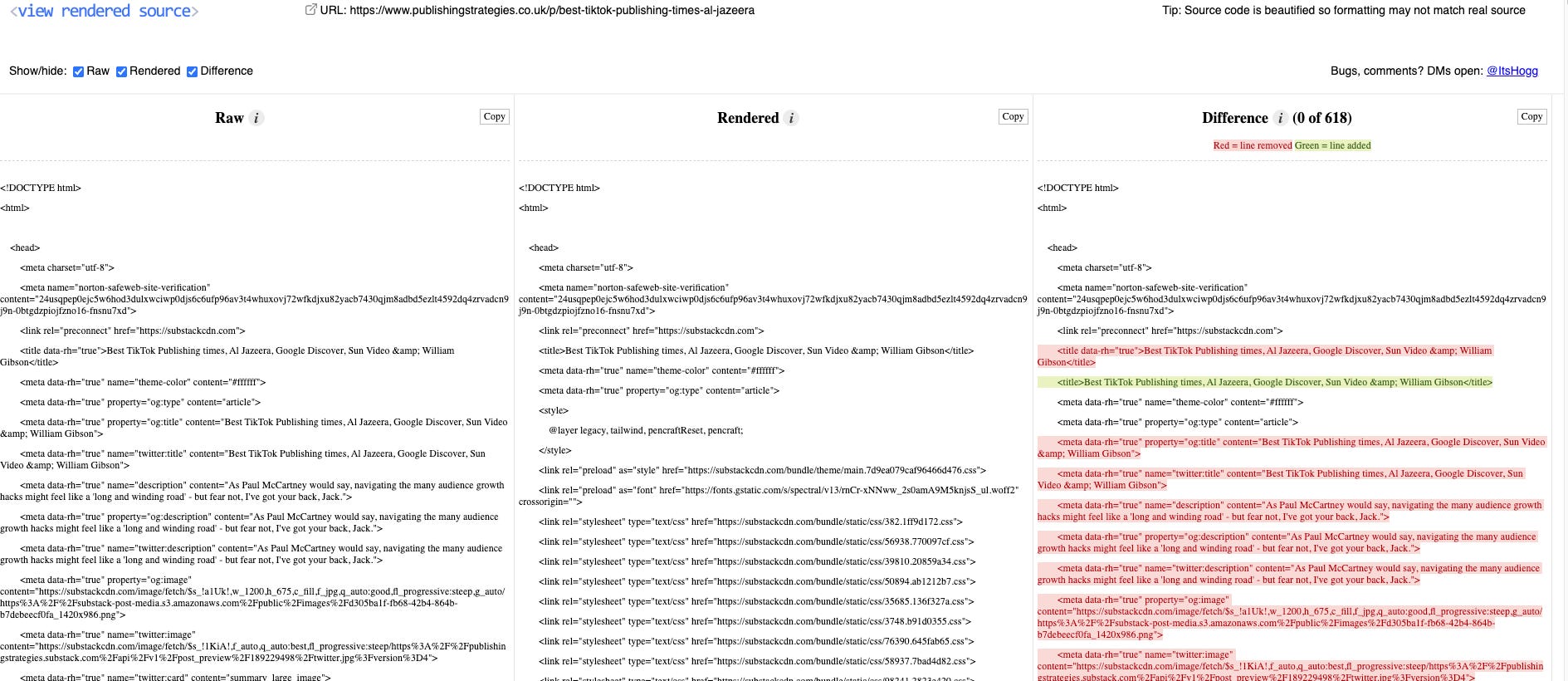
The first step is to stop looking only at what the page looks like and start looking at what the page contains. That means checking the rendered page structure, not just the visual design or the CMS preview. Open the page in browser developer tools. Inspect the elements. Compare what is delivered initially (resource) with what appears after scripts run. Look at the heading structure. Look at the links. Look at whether the main content is present clearly in the page structure or assembled too late to be reliable.
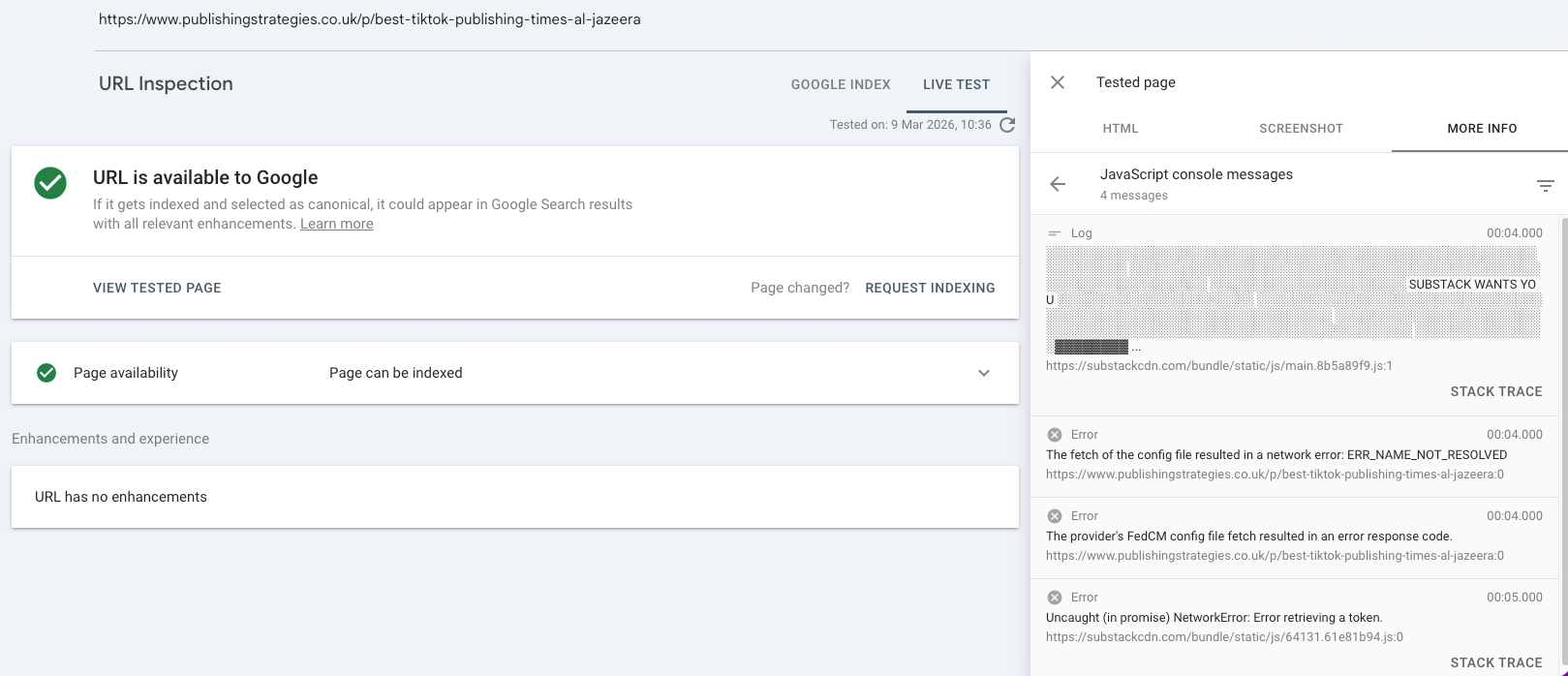
There are also many other tools that can help there including the View Rendered source extension or even Screaming Frog which is useful for projects at scale.
Step Two: Identify what must be present for search.
On most publishing pages, this means the main headline, introductory text, core body copy, canonical information, metadata, internal links and any structured data you depend on. Those are not decorative extras. They are part of how search engines decide what a page is about and how it fits into the rest of your site. If those elements are unstable, everything built on top of them becomes less dependable.
Step Three: simplify where possible.
Not every part of a page needs to be rendered in the most dynamic way available. If important content can be delivered clearly in the initial page structure, that is often the safer option. Dynamic experiences have their place, but they should add to the page, not carry the entire burden of making it understandable.
Step Four: review internal linking with more care than many teams do.
On publishing sites, internal links are one of the clearest ways to support discovery and topic understanding. They connect articles to sections, sections to tags, tags to hubs and newer stories to evergreen ones. If those links are weak in the DOM, you are not just losing a usability feature. You are weakening your site’s search architecture.
Finally, and perhaps most importantly, treat DOM quality as a cross-functional responsibility. SEO teams may spot the symptoms, but they cannot fix template logic alone. Developers may build the components, but they may not know which page elements matter most for visibility unless that is made clear. Publishing leaders may own performance targets, but those targets depend partly on technical implementation. The best results come when these groups are looking at the same problem from the same angle.
That, really, is the main point.
If your page structure makes it easy for search engines to understand what matters, your SEO work has a stronger foundation. If it does not, even excellent content can end up working harder than it should for visibility.
Some useful resources:
🚀🚀🚀🚀🚀🚀🚀🚀🚀🚀🚀🚀🚀🚀🚀🚀🚀🚀🚀🚀🚀🚀🚀🚀🚀🚀🚀🚀🚀🚀🚀🚀🚀
A quick reminder that I am hosting an SEO & AI Visibility course for journalists on March 31st. You can read all the deets about the session here. Get involved!
🚀🚀🚀🚀🚀🚀🚀🚀🚀🚀🚀🚀🚀🚀🚀🚀🚀🚀🚀🚀🚀🚀🚀🚀🚀🚀🚀🚀🚀🚀🚀🚀🚀